
Debug Logs
This guide outlines how vJailbreak handles debug log collection for VM migrations. Traditionally, enabling debug logs required editing ConfigMaps and restarting pods. With the current setup, debug logs are automatically collected and stored without any manual intervention. In kubectl logs of the pod, normal logs will be displayed as usual.
How It Works
-
For every migration executed via vJailbreak, debug logs are written to the host system under
/var/log/pf9. -
A high-level milestone log is written for the migration at:
/var/log/pf9/<migration-name>.logThis mirrors the same key milestone messages (e.g. “Snapshot created”, “Starting NBD server”, “VM active”) that also appear in
kubectl logsfor the pod — it is not a full copy of the pod’s stdout/stderr. -
In addition, logs are now split by category into a dedicated directory for the migration:
/var/log/pf9/<migration-name>/<category>.<timestamp>.logEach category captures the output of a specific part of the migration, so an issue can be traced straight to the relevant subsystem instead of scanning one milestone log:
Category Contents nbdNBD/ nbdcopydisk-copy commands and their outputvirtv2vvirt-v2vconversion commands and their outputgeneralEverything else run during the migration -
These logs are centrally accessible from the vjailbreak node, simplifying the debugging process.
Log File Location
| Node Type | Path | Description |
|---|---|---|
| vjailbreak-master | /var/log/pf9/<migration>.log | High-level milestone log for the migration |
| vjailbreak-master | /var/log/pf9/<migration>/<category>.<timestamp>.log | Per-category split logs (nbd, virtv2v, general) |
Example
If a migration is named vm-migrate-001, its logs will be available at:
/var/log/pf9/vm-migrate-001.log— milestone log/var/log/pf9/vm-migrate-001/nbd.2026-08-25-10:15:00.log— disk-copy log/var/log/pf9/vm-migrate-001/virtv2v.2026-08-25-10:20:00.log— conversion log
on the vjailbreak node.
Log Retention
As of v0.5.0, these logs are cleaned up automatically:
- The
sync-daemonDaemonSet checks every 5 minutes and deletes files older than the retention period. A migration’s logs are never deleted while it’s still active (last modified within 60 minutes). - Default retention is 24 hours, also the minimum allowed value.
- Configure the retention period with the
LOG_RETENTION_HOURSsetting (Global Settings UI, or thevjailbreak-settingsConfigMap) — see Use vJailbreak Settings.
Downloading a Debug Bundle from the UI
Instead of SSHing into the vjailbreak node to collect logs manually, you can download a full debug bundle directly from the migration’s Pod logs tab.
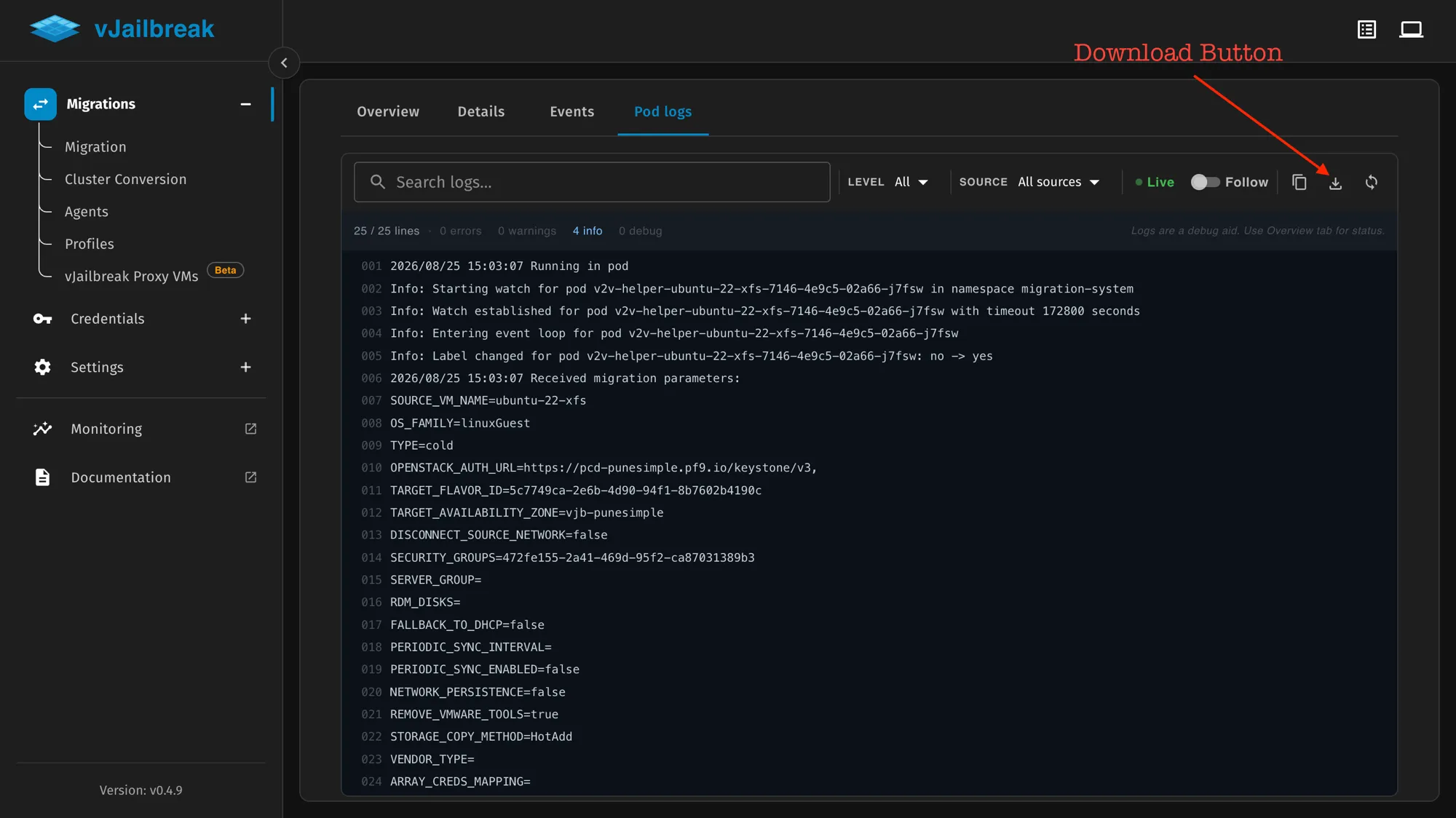
There is a download button as shown in the image above. This downloads all the logs, debug logs, and everything related to the migration as a tar ball — no extra kubectl or SSH access is required.